L Bracket
A customizable, 3D printable two hole L-bracket with independently adjustable leg lengths, and reinforced corner geometry.
This customizable L-bracket provides a lightweight, practical solution for connecting or mounting components at a 90-degree angle.
Unlike fixed-size hardware store brackets, each leg can be independently sized to fit your application. Whether you're joining panels, mounting small fixtures, repairing furniture, or creating custom assemblies, the bracket can be configured to match your specific dimensions.
The design features a hollow triangular reinforcement that adds rigidity while minimizing material consumption. Its geometry is optimized for FDM 3D printing, with support-free construction and integrated mounting holes.
Related designs
Printing Tips
Printing Technology: FDM
Layer Height: 0.2 mm
Perimeters: 4
Infill: 10%
Infill Pattern: Gyroid
Recommended Material: PLA, PETG, ABS, ASA
Supports: No
Support Type: None
Notes:
- Recommend using brim for ABS and ASA prints
Assembly Instructions
Materials Needed:
- PLA/PLA+: Suitable for general indoor applications with modest loads.
- PETG: Recommended where additional toughness and temperature resistance are beneficial.
- ASA: Suitable for applications requiring improved UV and weather resistance.
- 2x Wood Screws
Instructions:
- Measure the mounting surfaces and determine the required length of each bracket leg.
- Customize the bracket dimensions and generate your model.
- Download and print the customized bracket.
- Position the bracket against the mounting surfaces and mark the mounting hole locations.
- Drill pilot holes or install appropriate anchors as needed.
- Secure the bracket using appropriately sized screws, ensuring both mounting surfaces are firmly connected.
Customize Model
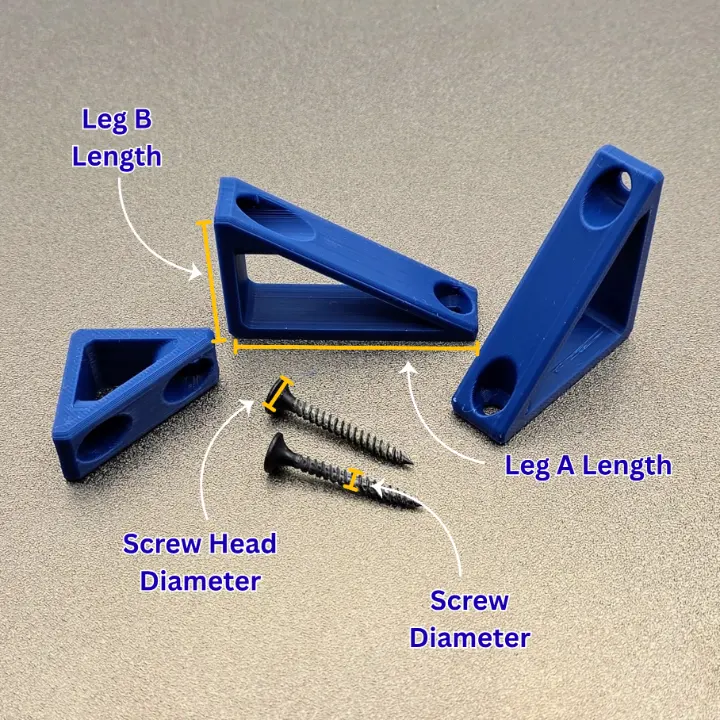
Measure each leg along its mounting surface and enter the lengths separately. Use the parameter diagram to identify Leg A and Leg B and check screw-head clearance.
By using the customization software, you agree to our Privacy Policy, Terms of Service, Disclaimer, EULA, and Cookie Policy.
Measure twice, customize once.
Something doesn't look right, or not sure what a setting means?
Download your design
Choose a file below and open it in your slicer. For designs with several components, download every part you need. Original files use the design defaults; your customized files appear here after generation.
Original files use the font saved in the design. To choose an available font for a new result, use Font at the top of Customize. Design default keeps the saved font.
Legal Disclaimer:
The files provided here are for personal, non-commercial use only. Redistribution, modification, or commercial use is not allowed without prior written consent from Lunar Prototypes.
Batch runs are a 3-step flow. You can revisit any step at any time.