Customizable Pole & Tool Wall Hook
3D printable wall hook for poles, brooms, tools, and bars. Customize the dimensions online for your garage, shed, or workshop. No CAD required.
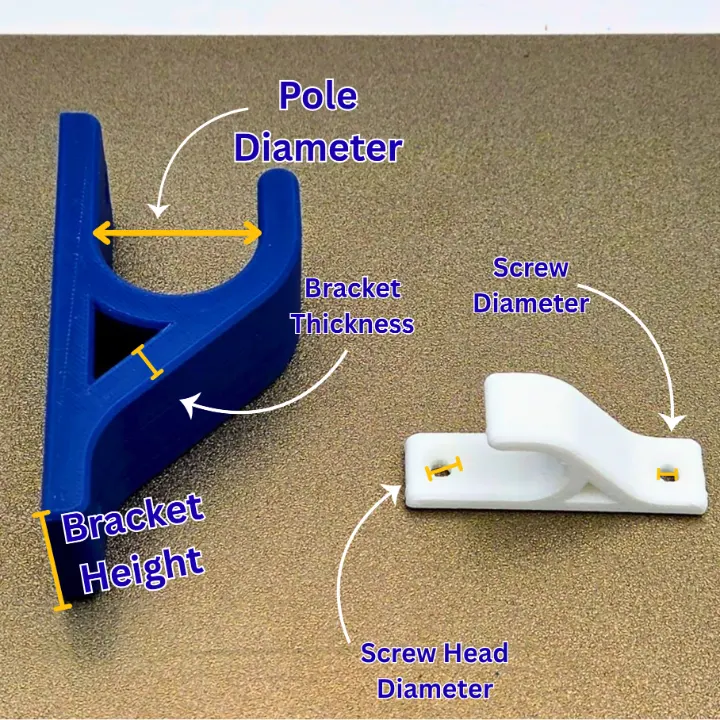
A customizable 3D printable wall hook for holding poles, tool handles, rods, and bars. Adjust the opening width and height to create a holder that fits your equipment instead of settling for a one-size-fits-all bracket.
Originally designed for a pool brush, this versatile hook is equally useful for organizing brooms, rakes, pool cleaning poles, and other long-handled tools in garages, sheds, workshops, or outdoor storage areas.
Mount a single hook for smaller items or use a pair to support longer tools horizontally. Customize the dimensions online and download your printable model. No CAD required.
Printing Tips
Printing Technology: FDM
Layer Height: 0.2 mm
Perimeters: 4
Infill: 10%
Infill Pattern: Gyroid
Recommended Material: PLA, PETG, ABS, ASA
Supports: No
Support Type: None
Notes:
- Use PETG, ASA, or ABS for outdoor applications.
- Choose mounting hardware appropriate for the surface and expected load.
- For long or heavy objects, use multiple hooks to distribute the weight.
Assembly Instructions
Instructions:
- Measure the diameter or width of the pole, handle, or tool you want to store.
- Customize the hook dimensions to fit your application, allowing a little clearance for easy removal.
- Download and print your customized hook. Print two or more for supporting longer items horizontally.
- Position the hook on a wall, fence, post, or other suitable mounting surface.
- Secure using an appropriate screw and wall anchor if needed.
- Place your tool or pole in the hook and verify a secure fit.
Customize Model
Measure the widest part of the section of the handle the hook will support. Check the opening and leave space to lift the handle out.
By using the customization software, you agree to our Privacy Policy, Terms of Service, Disclaimer, EULA, and Cookie Policy.
Measure twice, customize once.
Something doesn't look right, or not sure what a setting means?
Download your design
Choose a file below and open it in your slicer. For designs with several components, download every part you need. Original files use the design defaults; your customized files appear here after generation.
Original files use the font saved in the design. To choose an available font for a new result, use Font at the top of Customize. Design default keeps the saved font.
Legal Notice:
Batch runs are a 3-step flow. You can revisit any step at any time.